
Product · Early Access

More context.
Less noise.

A Command Center, a contextual engineer, individual and shared strategy, a strategy overlay and optional subtitles. Facts, estimates and limitations are always distinguished.

Context before data

What matters now, within the whole race.

Live brings together the priority message, session state and available evidence. Quantities appear as digits—for example, 3.42 liters—in Live, history, strategy and subtitles. Speech keeps its natural wording and the same arbitration.
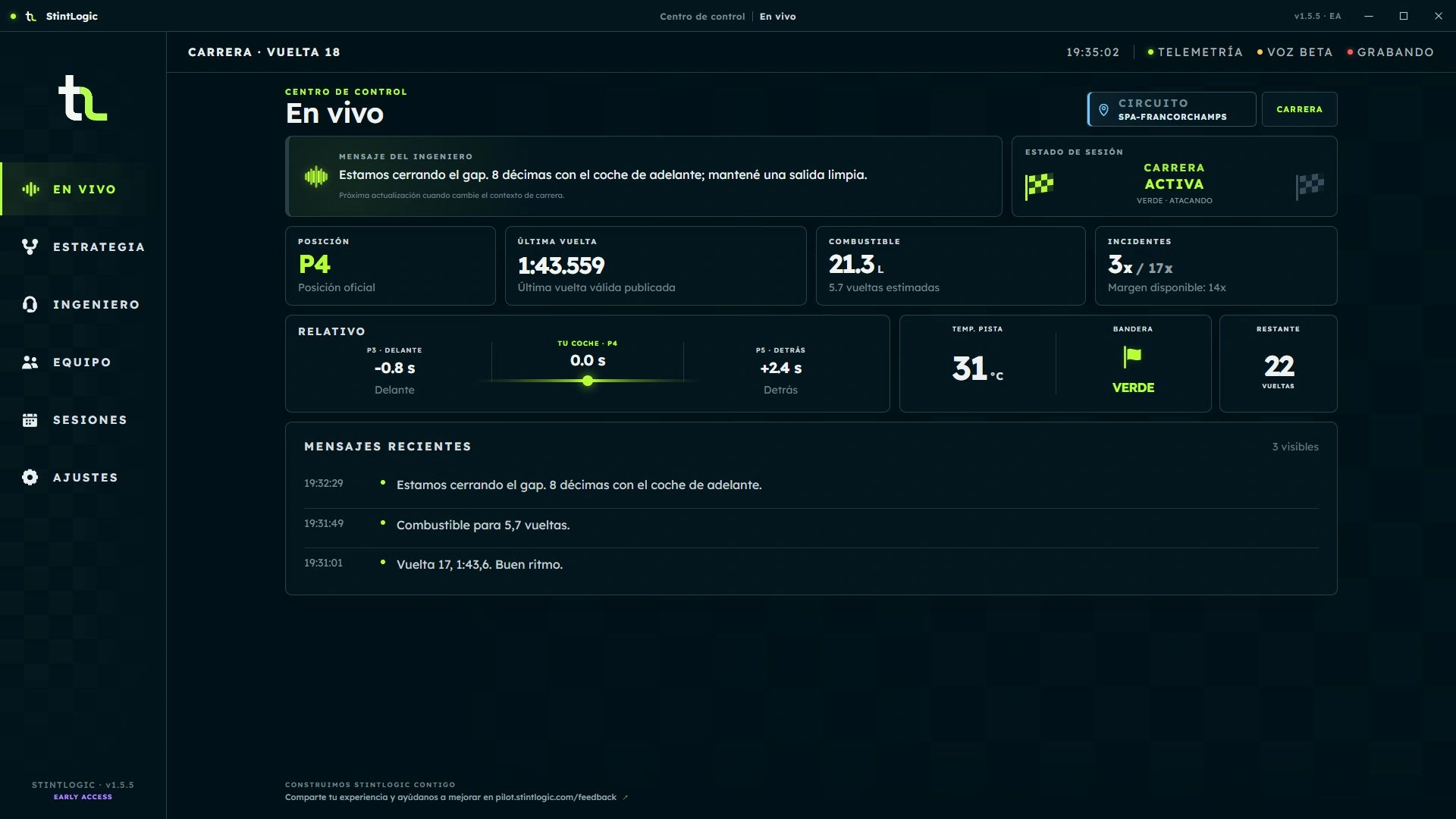
  • Position, pace, fuel and incidents when iRacing publishes them.
  • The Feedback button opens Platform's reporting channel in your browser.

Live

Race state, numbers in engineer messages and feedback access. Spanish interface with sample data.
Desktop 1.5.5 beta · Sample data · Open the image to see the details.

Strategy Engine v2 · BETA

One plan per event. Estimates with context.

The v2 engine operates as the controlled primary strategy authority. Choose Manual or Automatic activation: it applies once per server event and maintains continuity across practice, qualifying and the race in that event. Opening StintLogic alone does not activate a plan.

  • Manual requires your action; Automatic applies the saved policy to the event.
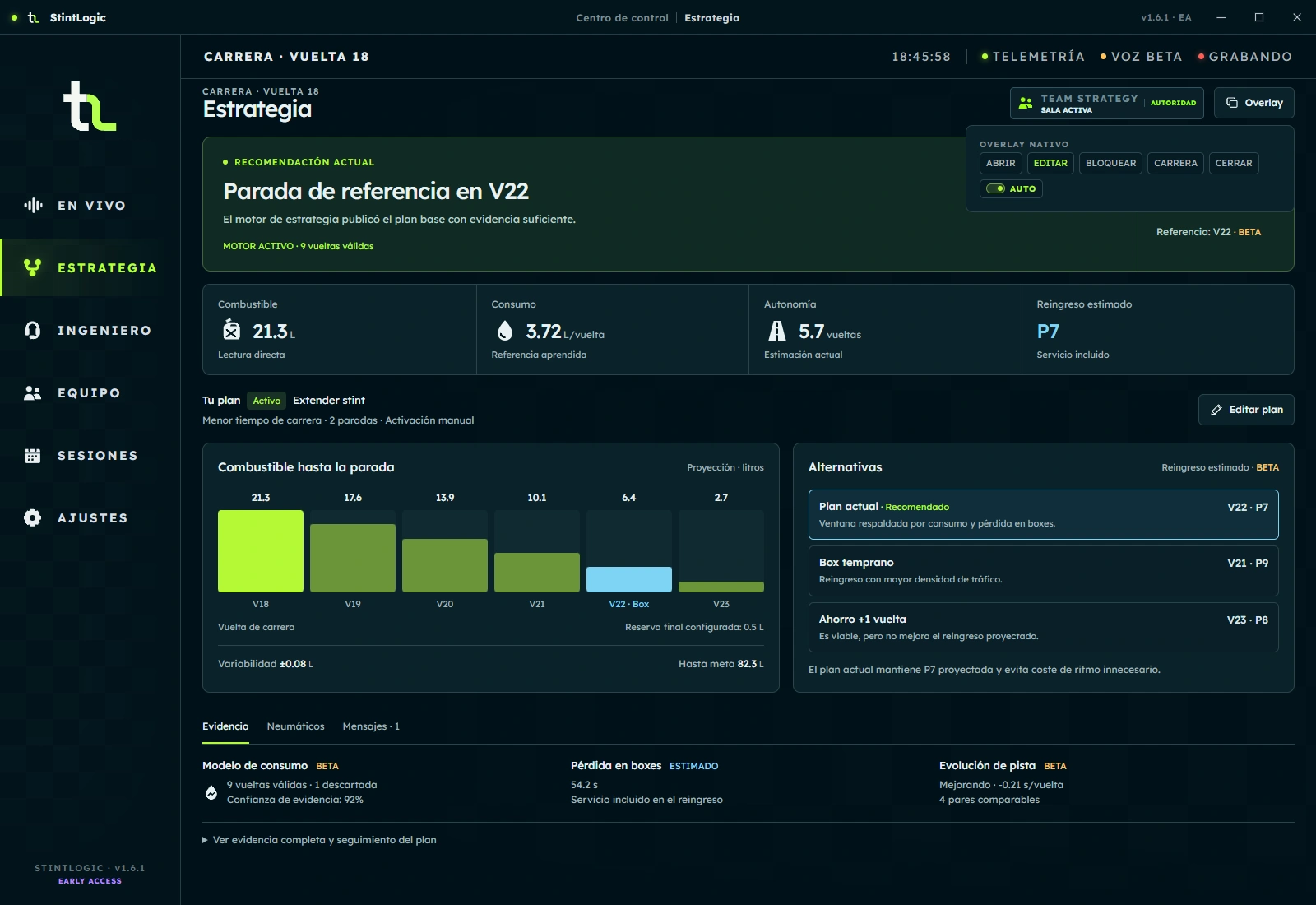
  • The overview brings together the recommendation, pit window, fuel to the stop and alternatives.
  • A prepared plan can wait for race evidence before acting.
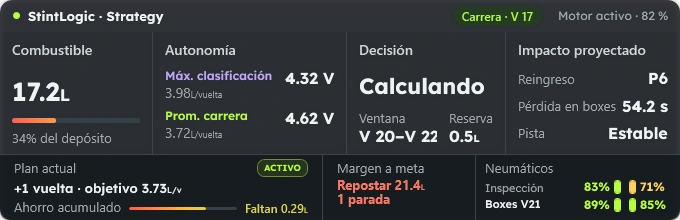
  • The strategy overlay lets you choose modules, position, size and transparency. Edit, Lock and Race control its interaction.

BETA · ESTIMATED. Range, pit windows, scenarios and rejoin require broad on-track validation. They are not guarantees or driving commands.
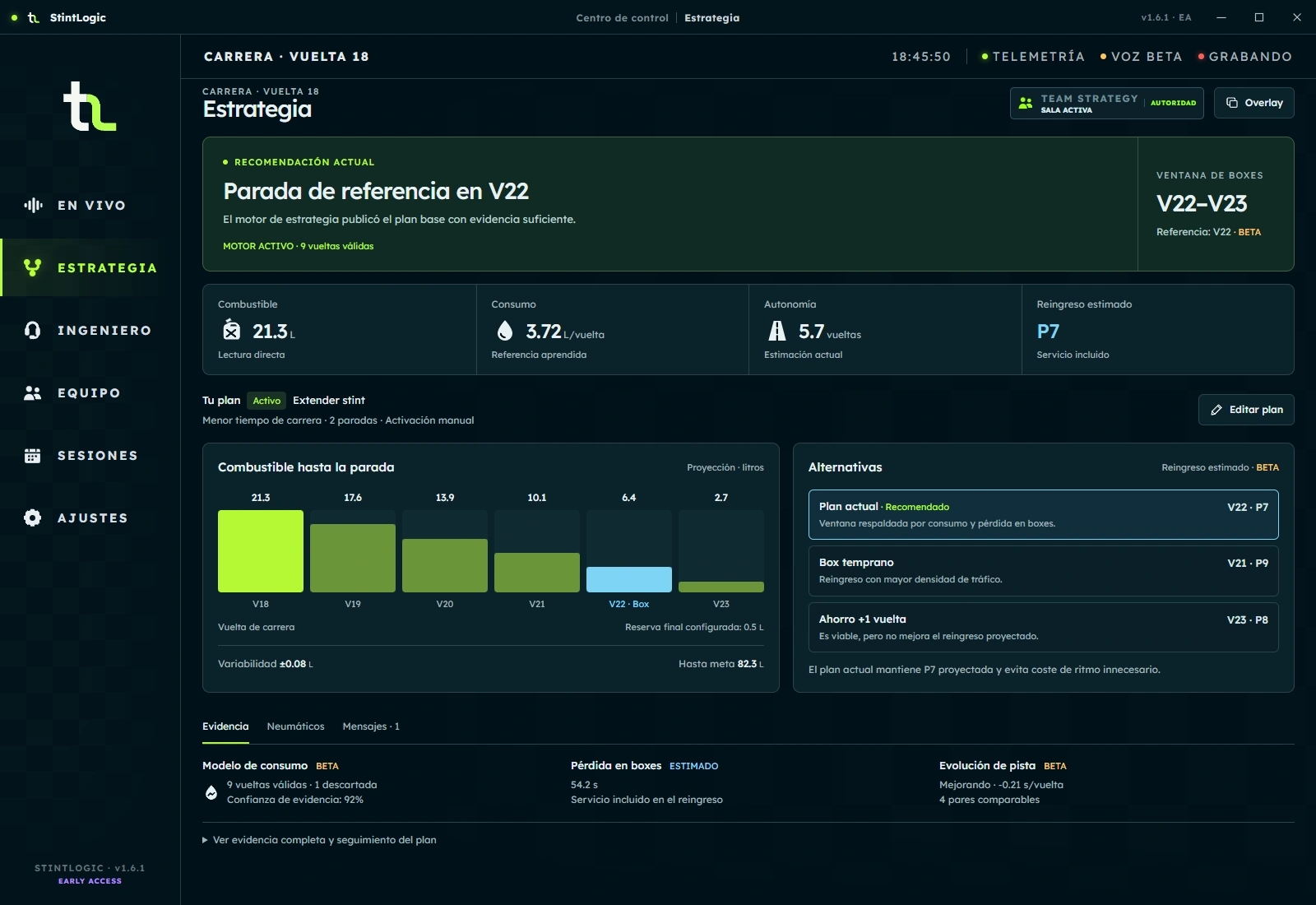
Strategy · Overview

Current recommendation, pit window, fuel to the stop and plan alternatives. Spanish interface with sample data.
Desktop 1.6.1 beta · Interface with sample data · Open the image to see the details.

Strategy overlay

Native render with fuel, range, active plan and margin at the finish. Spanish interface with sample data.
Desktop 1.5.5 beta · Sample data · Open the image to see the details.

From the plan to its details

View the configuration and data behind each estimate. Images show the interface with sample data, not a real race.

Configure your next plan

Define the desired outcome, tactical policy, planned stops and service time. Choose manual or automatic activation when entering the race. Tolerance is recorded; its application depends on engine calibration.
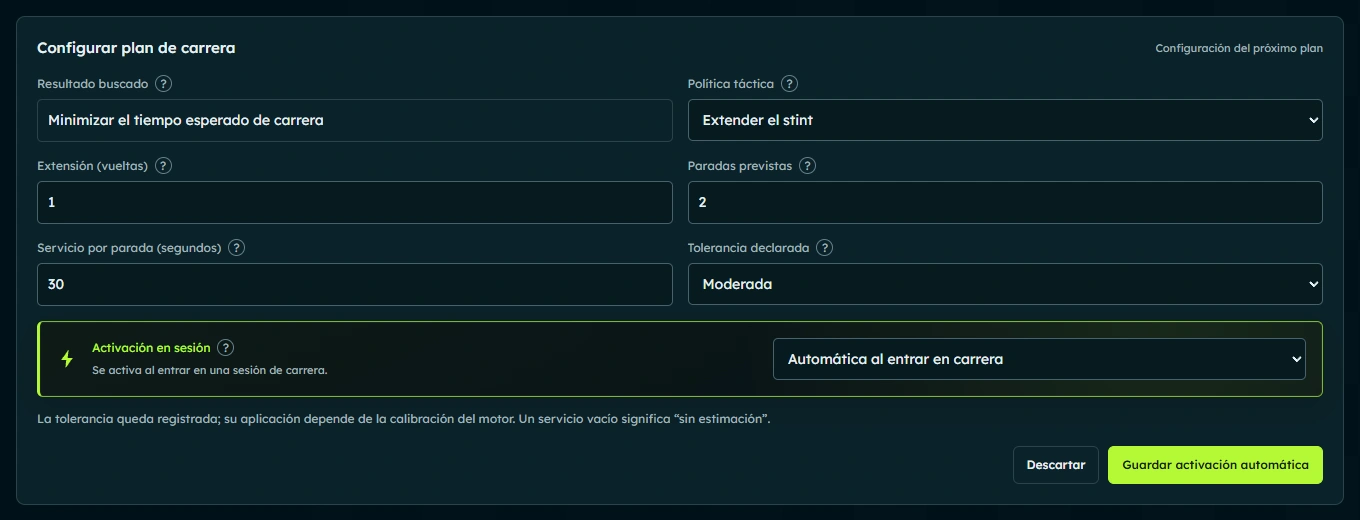
Plan configuration

Editor with desired outcome, tactical policy, stops, service and session activation. Spanish interface with sample data.
Desktop 1.6.1 beta · Interface with sample data · Open the image to see the details.
Balance, tracking and rejoin

Review fuel to the finish and reserve, progress toward the target and estimated position after the pit stop. Projections depend on available evidence and do not guarantee the outcome.
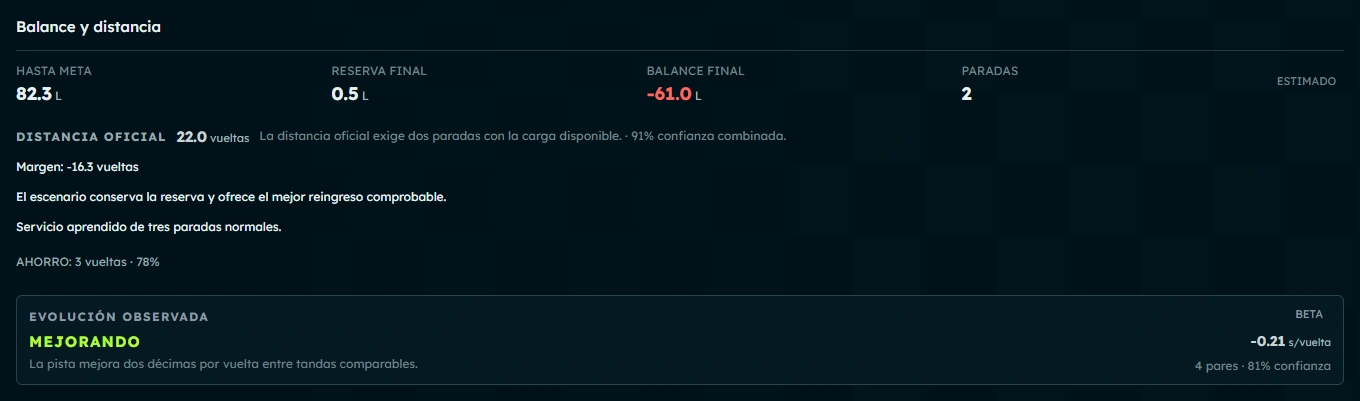
Balance and distance

Fuel to the finish, final reserve, balance, stops and observed track evolution. Spanish interface with sample data.
Desktop 1.6.1 beta · Interface with sample data · Open the image to see the details.

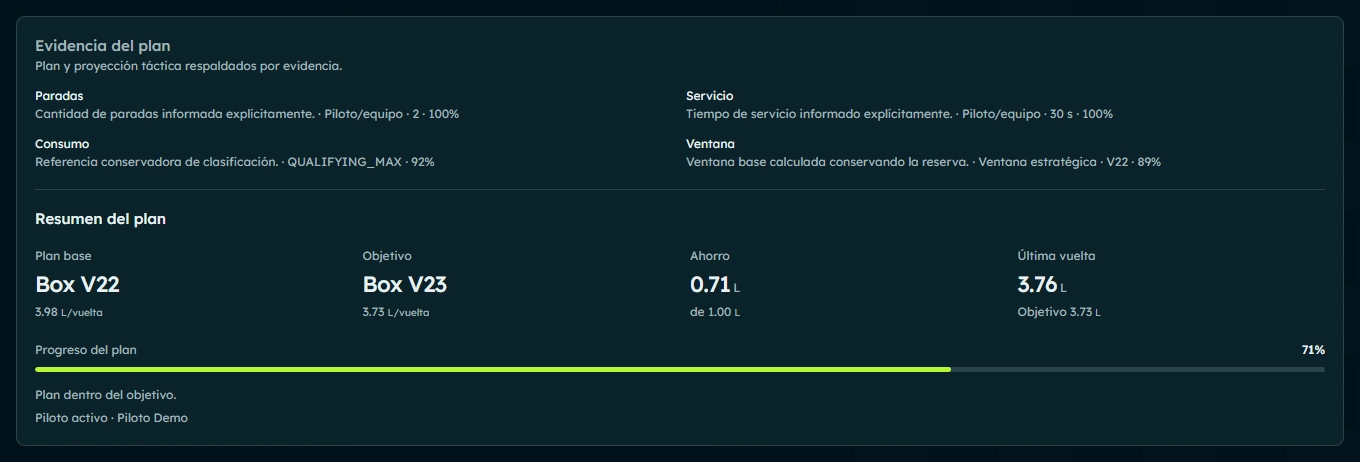
Plan tracking

Evidence for stops, service, consumption and window, with a summary and saving progress. Spanish interface with sample data.
Desktop 1.6.1 beta · Interface with sample data · Open the image to see the details.

Estimated rejoin

Projected position after the pit stop, including service and gaps to nearby rivals. Spanish interface with sample data.
Desktop 1.6.1 beta · Interface with sample data · Open the image to see the details.
Tires: temperature and wear

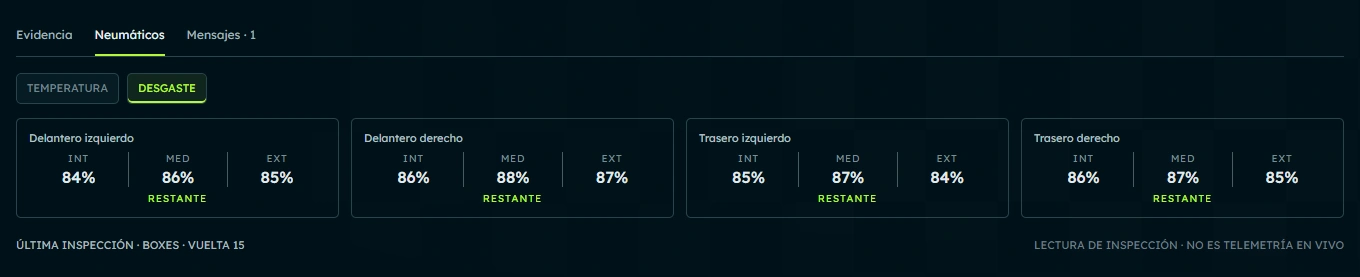
Switch between temperature and percentage remaining for each tire. These are readings from the last pit inspection, not live tire telemetry.
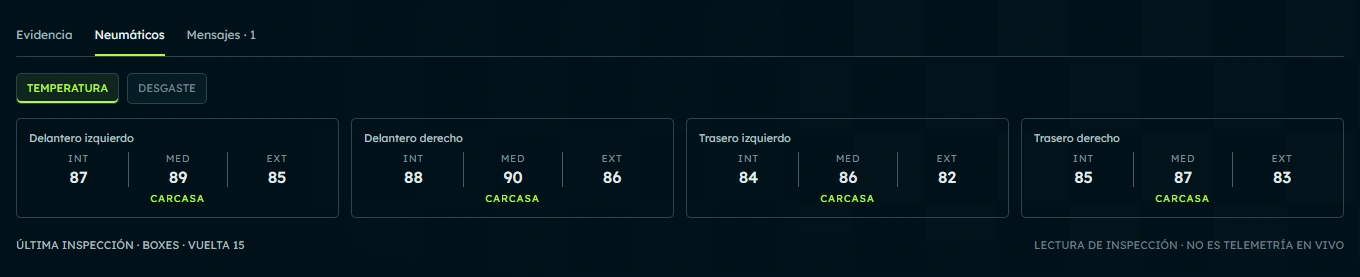
Tires · Temperature

Per-tire temperatures from the last pit inspection; this is not live telemetry. Spanish interface with sample data.
Desktop 1.6.1 beta · Interface with sample data · Open the image to see the details.

Tires · Wear

Percentage remaining per tire in the inspection wear view. Spanish interface with sample data.
Desktop 1.6.1 beta · Interface with sample data · Open the image to see the details.
Messages and overlay controls

Review strategy calls with their timestamps and open overlay controls from Strategy. The menu shown belongs to Desktop; the native overlay is a separate surface.

Strategy messages

Timestamped call with pit window and projected rejoin position. Spanish interface with sample data.
Desktop 1.6.1 beta · Interface with sample data · Open the image to see the details.

Overlay controls in Desktop

Menu to open, edit, lock, use in race and close the overlay; it does not show the native overlay. Spanish interface with sample data.
Desktop 1.6.1 beta · Interface with sample data · Open the image to see the details.

Team Strategy · Early Access

One team. One shared plan.

Create and share a room from Team in StintLogic, without a Platform account. Team Strategy requires an Internet connection; individual features continue working on your computer.

  • The coordinator maintains one shared plan; other members have read-only access.
  • Coordinator, active driver and telemetry source are separate authorities.
  • Transferring coordination preserves the active plan without changing the driver or telemetry source.
  • Trust, permissions and room recovery are available. Use the same Desktop version on every computer.

Available in Early Access. Broad on-track testing is in progress; multi-driver verification is still pending. The image shows sample data, not a real team session.
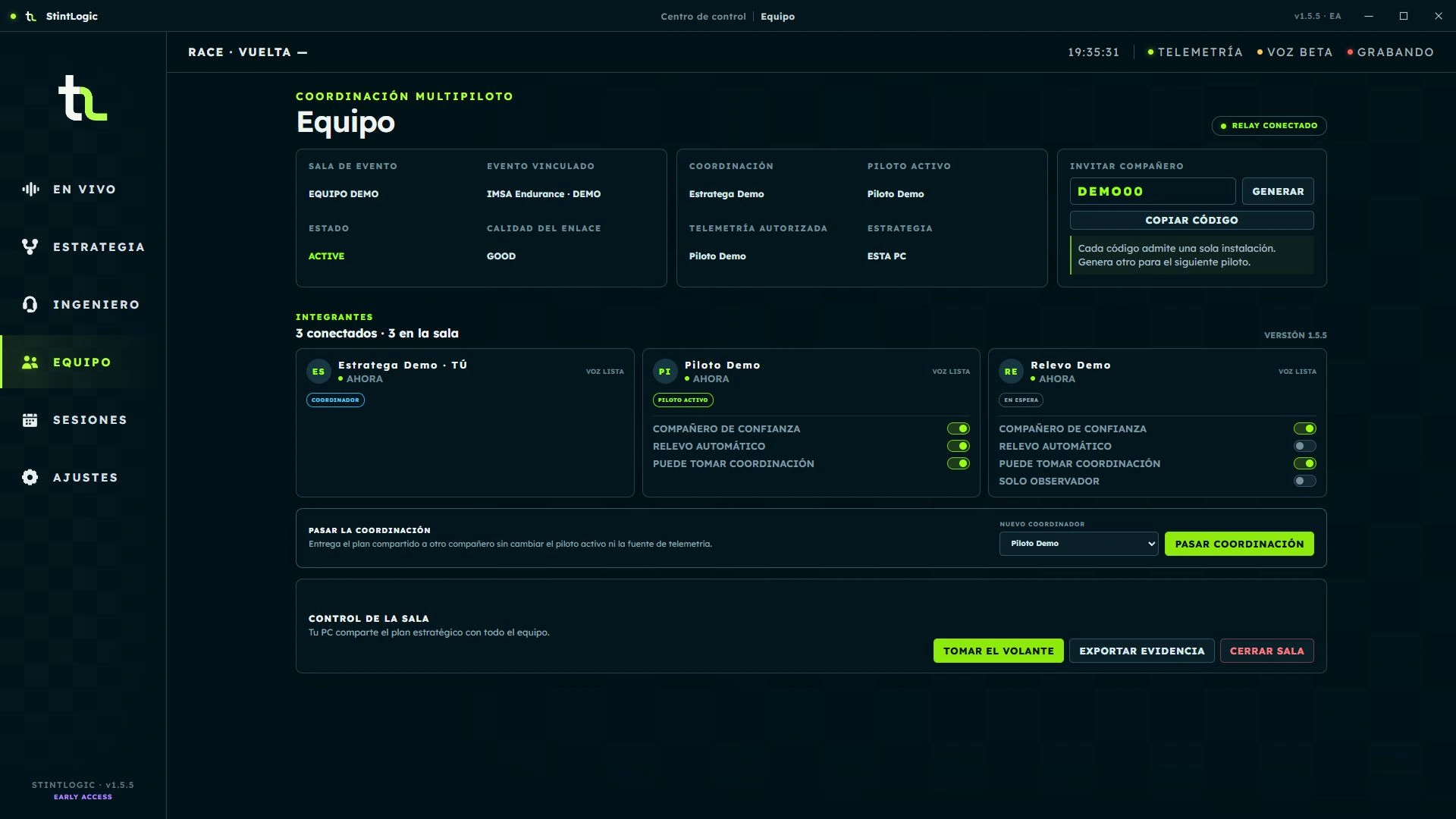
Team Strategy

Demo room with three members, roles, trust policies and coordination transfer. Spanish interface with sample data.
Desktop 1.5.5 beta · Sample data · Open the image to see the details.

Configurable behavior

Prioritized communication, including pit box arrival.

Balanced, Direct and Motivating preserve the same decision and data. Profiles, cadence, strictness, categories and temporary mute modify non-critical communication without disabling safety alerts.

  • Configure the pit box arrival countdown from Engineer: 5 → 1 → Box.
  • It needs a valid reference; it stays silent when data is insufficient or conditions are unsafe.

Validated on track and available in Early Access. The pit box arrival countdown is an approximate reference, not braking guidance.
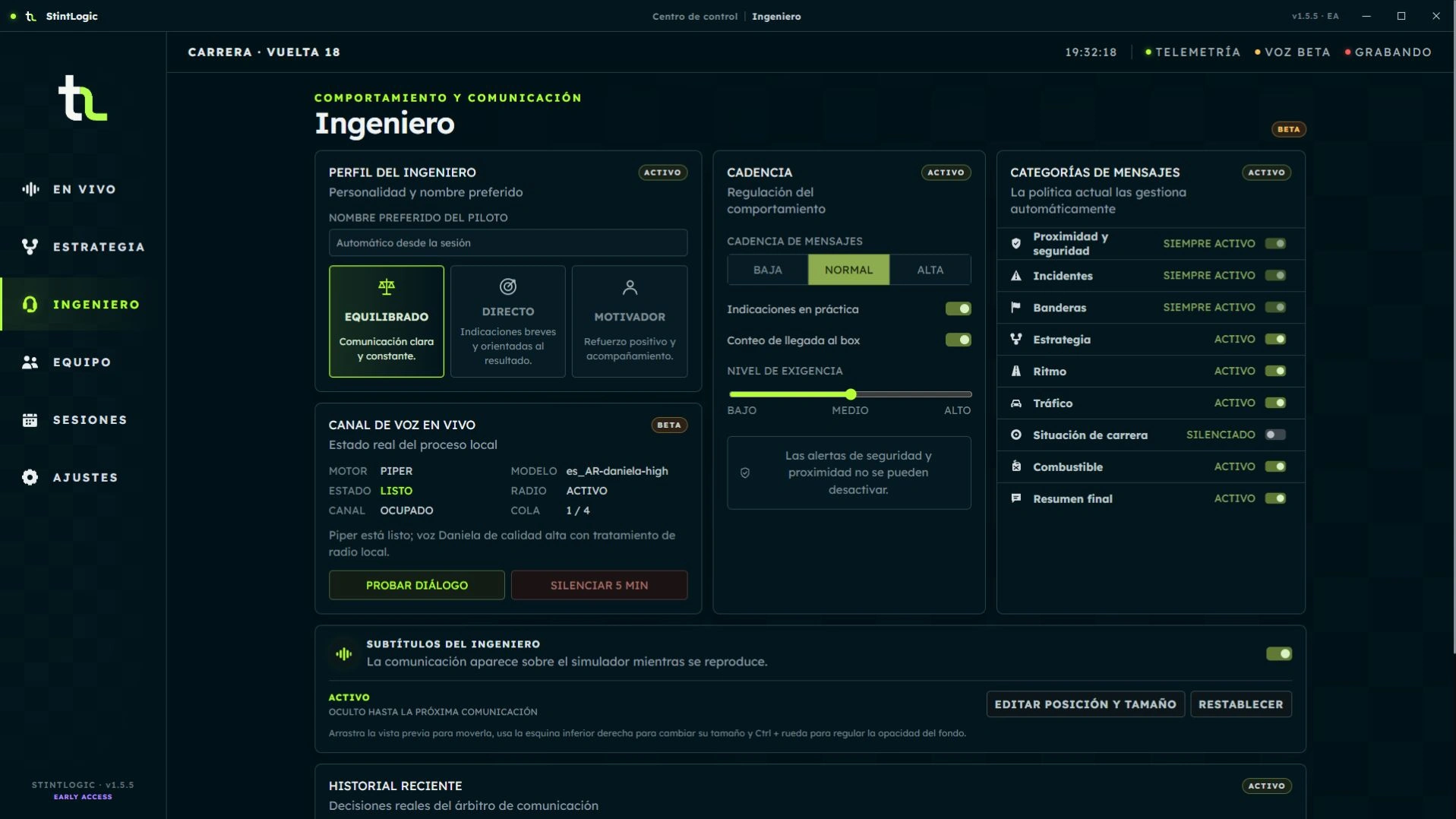
Engineer · Pit box countdown

Profile, cadence, categories and pit box arrival countdown control. Spanish interface with sample data.
Desktop 1.5.5 beta · Sample data · Open the image to see the details.

Two separate visual surfaces

Read the engineer without losing sight of strategy.

The optional subtitle overlay shows the engineer's communication while its audio plays. It does not transcribe the microphone or replace the strategy overlay.


  • Enable it in Engineer and adjust position, size and opacity.
  • Use the preview before driving.
  • The displayed number 3.42 represents the same value as the spoken message.

Subtitle settings

Activation and access to subtitle overlay position, size and opacity. Spanish interface with sample data.
Desktop 1.5.5 beta · Sample data · Open the image to see the details.

Subtitle overlay

Engineer communication with the decimal number 3.42 and a radio animation captured in one frame. Spanish interface with sample data.
Desktop 1.5.5 beta · Sample data · Open the image to see the details.

Voice, radio and history

Speech is generated on your computer.

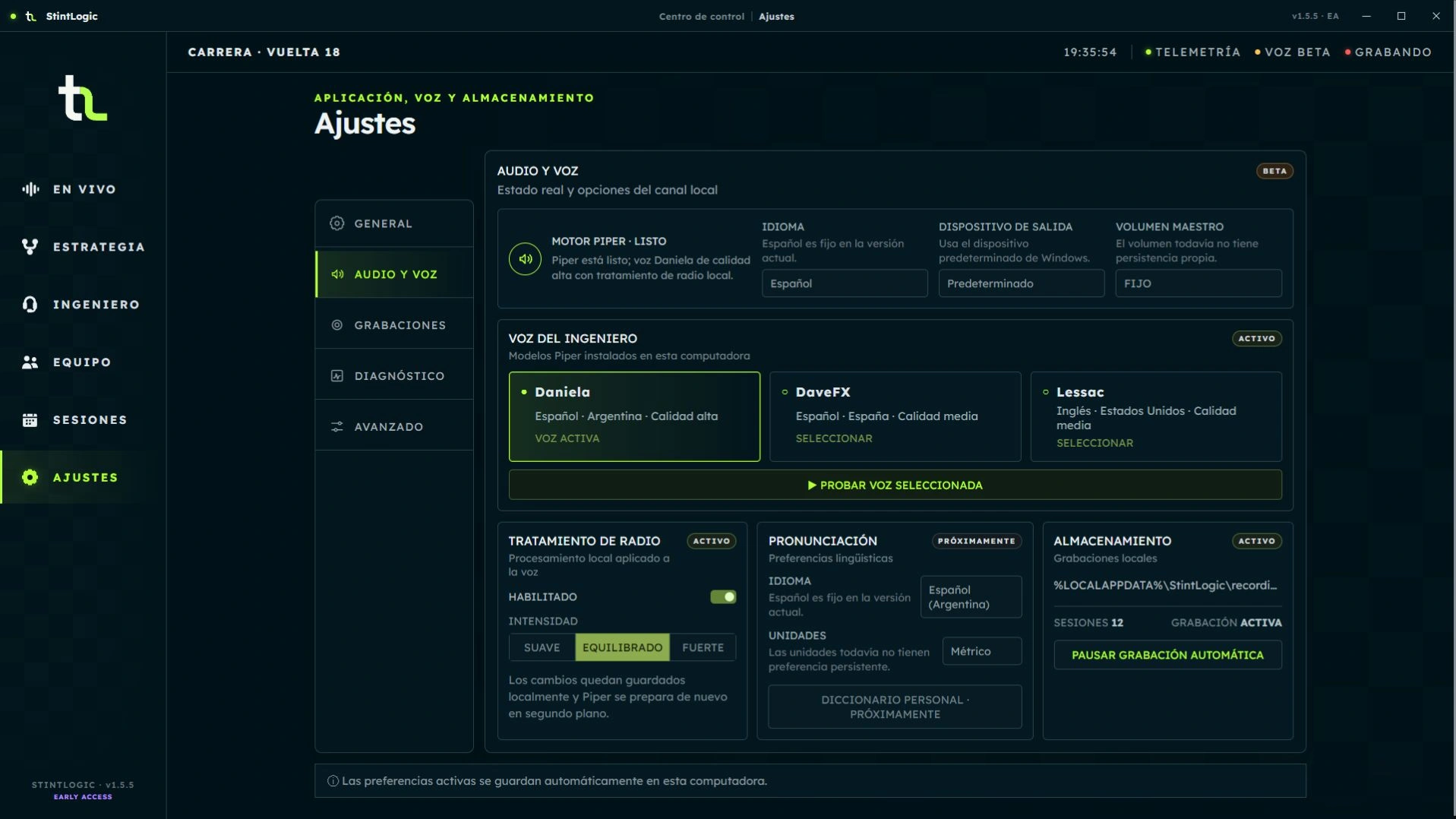
Piper provides the voices available in Desktop and local radio processing. History lets you review played, skipped or interrupted messages and their priority.
  • Numeric presentation does not alter speech or decisions.
  • The Piper channel remains in beta.

Audio and voice

Voices available in the demo scenario and local radio processing. Spanish interface with sample data.
Desktop 1.5.5 beta · Sample data · Open the image to see the details.

Verifiable memory

Record, replay and share only what you choose.

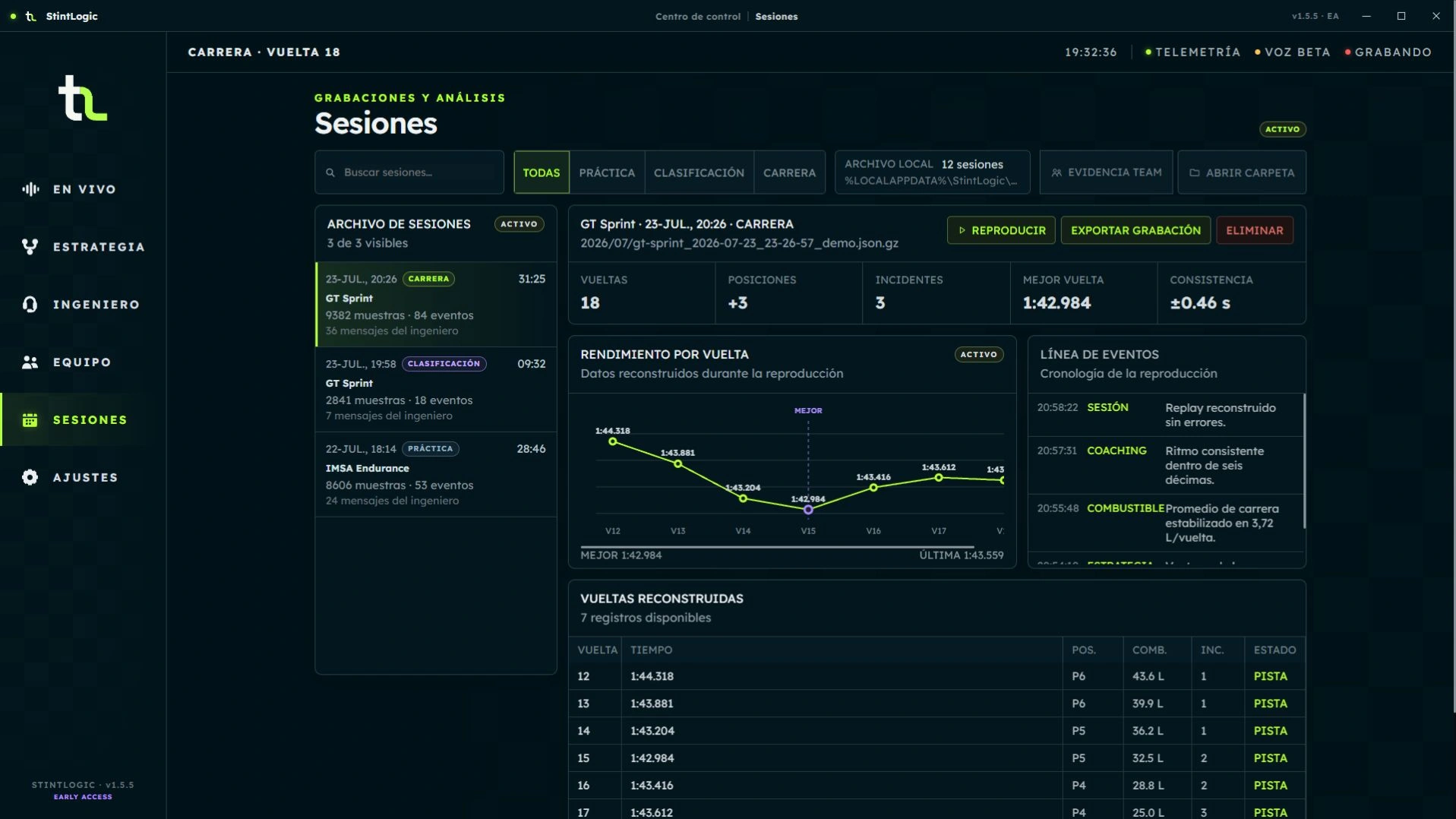
The local catalog brings together recordings, laps, performance and event timelines. You can replay a session and export a .stintlogic-recording package as evidence for feedback.
  • Recordings are not uploaded automatically.
  • Platform accepts feedback and an optional recording with consent; it does not accept logs.
  • Feedback uses a private email link, with no participation application.

Sessions and evidence

Demo archive, replay, export, performance and event timeline. Spanish interface with sample data.
Desktop 1.5.5 beta · Sample data · Open the image to see the details.

Product status

Implemented does not mean validation is complete.

Available in EA identifies features implemented for Early Access. No invitation is required; features remain subject to on-track validation.

Available in EA

Context and safety

Telemetry published by iRacing, session context and local engineer and spotter alerts.

Available in EA

Team Strategy

Private room, roles and trust, shared plan, coordination transfer and room recovery. Multi-driver regression testing is still pending.

BETA · Estimated

Strategy Engine v2

Controlled primary strategy authority. Range, windows, scenarios and rejoin require broad on-track validation.

Available in EA

Race Plan

Manual or Automatic activation once per server event; continuity across practice, qualifying and the race in the same event.

Available in EA

Engineer and numbers

Profiles, cadence, strictness, categories and temporary mute. Readable displayed numbers without changing speech or its priorities.

Available in EA

Overlays

Configurable strategy and optional engineer subtitles. The subtitle overlay and its synchronization with speech are validated on track.

Available in EA

Pit box arrival

Countdown 5 → 1 → Box and silence when data is insufficient are validated on track. This is an approximate reference, not braking guidance.

Available in EA

Sessions and feedback

Recording, replay, export and feedback access from Live; optional attachments with consent.

BETA · Under validation

Local voice

Local Piper and radio processing in beta. Subtitle overlay synchronization with speech is validated on track; this does not validate every audio condition.

Screenshots show real components with demo data and separate scenes. They are not evidence of Store installation, synchronized speech, relay or real sessions.
